
No waiting on a developer
Change text, photos, prices, hours and services yourself, in minutes.

The content management system for small and mid-size businesses.
Change your prices, photos, services and hours yourself, in minutes, without waiting on a developer. Rename or move a page and keep your place on Google. Add an online store, or AI for the boring parts, when you're ready. Own everything we build.
5.05 out of 5.8 Google reviews
The short version
Every website has two sides. The side your customers see, and the side where someone changes what they see. A content management system, or CMS, is that second side: the screens where you update a price, add a photo or publish a new page, without touching code.
Most businesses already use one. Wix, Squarespace and WordPress are all CMSs. The real question isn't whether you need one. It's whether the one you have fits the way your business works.
How it works
Every MOST CMS is built on the same base. What changes is what you see when you log in. We build the screens around what you actually sell, so a dealership sees its vehicles and a studio sees its services.
You see your business: your services, your stock, your menu. Not a wall of settings you'll never use.
Edit a price, swap a photo, adjust your hours. Plain boxes, labelled in your words.
One button. No developer to email, no waiting until next week.
Photos are already sized for phones and laptops, and if a page address changed, the old one forwards to the new one so Google keeps your place.
Why it matters for a smaller business
A large company has people whose job is the website. Most small and mid-size businesses have the owner, a manager, and a long list of other things to do. MOST CMS is built for that reality.
Change text, photos, prices, hours and services yourself, in minutes.
You log in and see your business, not somebody else's idea of a website.
Give each person a login that shows only what they need.
Change a page address and the old one forwards to the new one, so you keep your place.
The code, the content, the customer data and the accounts are yours. No licence fee per user.
Need bookings, a store or another location next year? It's added to your system. You don't start again.
Real systems
A car dealership.
At CarGet Auto Group, staff type a VIN and the year, make and model fill themselves in. AI drafts the vehicle description and a person approves it. Inventory reaches Google on its own. The wording for Facebook, Craigslist and CarGurus is written once, not three times. Every lead, test drive and trade-in lands in one list, with the car and the source attached.
A beauty studio.
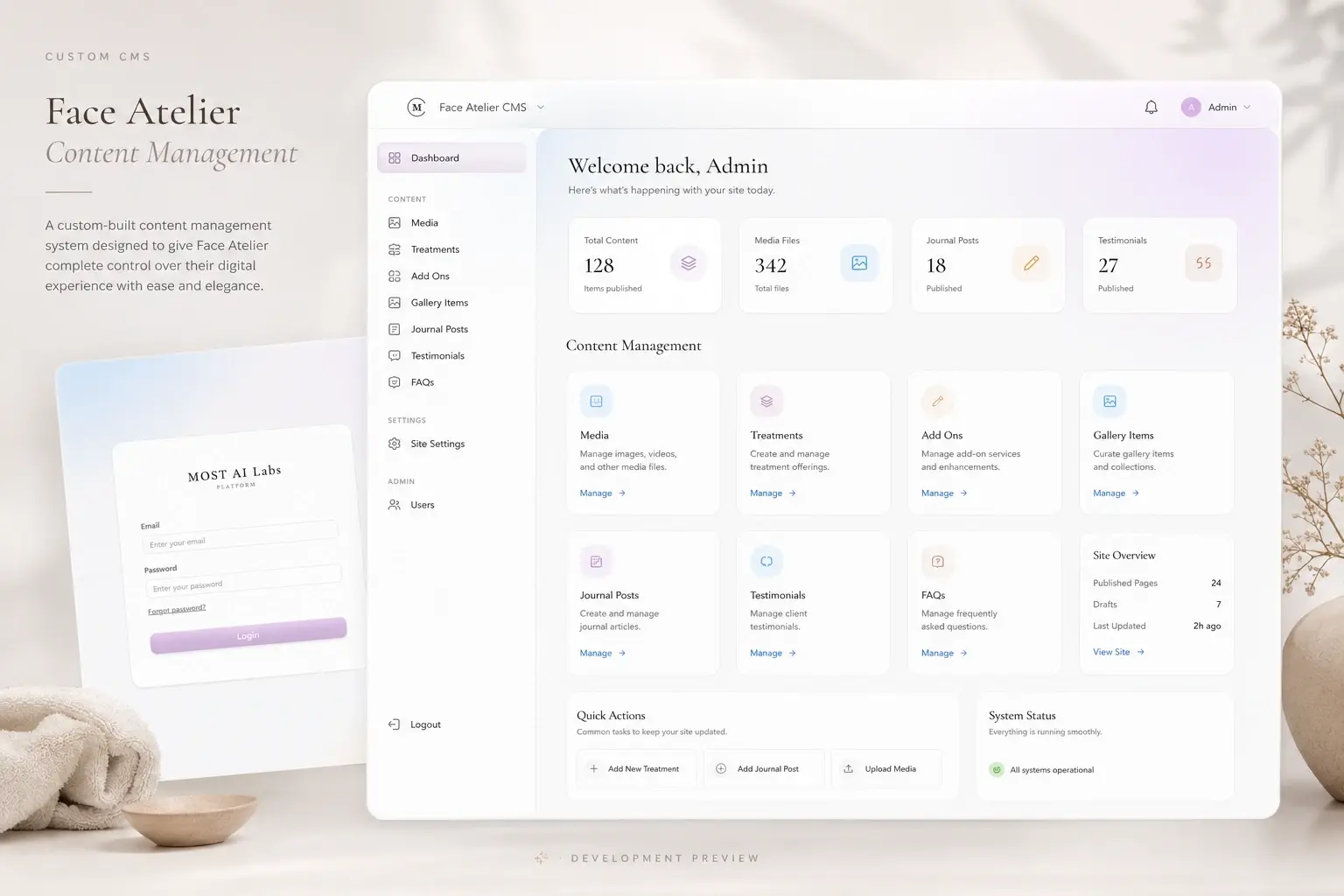
At Face Atelier, the owner changes her own services, prices, durations, opening hours, photos and videos, and publishes her own articles. No developer, no waiting.
A restaurant.
Menu, prices, daily specials, hours and catering enquiries, changed from a phone between services.
Same system underneath. A different set of screens for each business, because a dealership and a studio do not run the same way.
What it does
The first list is what our clients use today. The second is what we build when your business needs it. We keep the two apart on purpose, so you always know which is which.
Selling online
An online store isn't switched on by default. It's something we add to your system when your business is ready to sell online, so you're not paying for a shop you don't use yet.
Some businesses need a small shop: a short list of products and a payment page. Others need a full store, with stock levels, discounts and more than one currency. We build the size you need, and a small shop can become a full store later without starting your website again.
Your products, prices, photos and what's in stock, changed by you, not by a developer.
Card payments run through a trusted payment provider and land in your bank account. We never hold your money.
Every order, with the customer's details, in one list. Staff who pack and ship can be given a login that shows only that.
AI, where it helps
We build AI for a living, so you might expect a robot on every page. That's not how we work. AI goes into your system only where it saves you real time, and you always check the result before it goes on your site.
Give it a few facts about a product, a service or a car, and it writes the description. You read it, fix what you want, then publish.
Opening hours, prices, "do you do this": answered on your site, using what your own pages say.
Enquiries and form messages sorted by what they're about, so the right person sees them first.
Your pages translated for the customers you actually serve, with you approving the wording before it's published.
Each of these is added when you ask for it, and built around your business. None of them publishes anything without you. You can see one of these in the dealership example above.
Compared
| Comparison | Wix / Squarespace | WordPress | MOST CMS |
|---|---|---|---|
| Built for | Anyone, in an afternoon | Anyone, with plugins | Your business specifically |
| What you see when you log in | Their editor and their menus | A dashboard full of settings and plugin notices | Your business: vehicles, services, menu, leads |
| Adding a feature | Only what their app store offers | Find a plugin, hope it works with the others | We build it to fit how you work |
| Design | Pick a template, stay inside it | Pick a theme, customise around it | Designed for you; editing can never break it |
| Speed and Google | Limited by the platform | Depends on theme, plugins and hosting | Built fast from the start, with search in mind |
| Updates and security | Handled for you | Yours to manage: core, theme and every plugin | Handled by us, one update path |
| If you want to leave | You rebuild elsewhere; the site stays on their platform | You can take it with you | You can take it with you: code, content and data are yours |
| Cost | Monthly fee for as long as the site exists, plus paid apps | Hosting, premium plugins, and someone to maintain it | A fixed build price. No fee per user |
| Best when | You need a simple site this week and will build it yourself | You already have a WordPress person you trust | Your website has real work to do |
Straight answers
If you need a five-page site this weekend and want to build it yourself, use Wix. It is good at that. If you have a developer who knows your WordPress site inside out, keep them. MOST CMS is for a business whose website has to take bookings, handle stock, capture leads or save staff time.
The code, the content, the customer data and the accounts are yours. It is built on open-source technology, so you are never locked in to us. There is no licence fee per user.
Launching a software product? MOST for Startups includes MOST CMS, set up around a product instead of a menu.
The build
We sit down with you and list what you actually change, who changes it, and what each person should and shouldn't see.
Every box you fill in is labelled in your words, and the screens are laid out around your services, your stock or your menu.
If you're on WordPress or Wix, we move your content across and point every old page address at the new one, so your rankings carry over.
You and your team get your logins and a walkthrough. The code, content and data are yours.
A small system usually takes weeks. A larger one is built in stages, starting with the smallest version you can actually use. You get the timeline in writing before we start.
Questions
Yes. The content is moved, and every old page address is pointed to the new one so your Google rankings carry over.
It is added to your system. You do not start again.
MOST CMS is included in MOST Launch, $2,495 once, with a 5 to 8 page website built on it. There is no licence fee per user. Extending it with a store, bookings, more locations or more languages is quoted through MOST Scale, and the ranges are on the pricing page.
No. You fill in labelled boxes. You never touch code or page layouts, and editing can't break the design.
You do. The code, the content, the customer data and the accounts are yours. It's built on open-source technology, which any developer can work on, so you're never stuck with us, and there's no licence fee per user.
Usually not. If you need a simple site this weekend and want to build it yourself, Wix is good at that. MOST CMS is for a business whose website has to take bookings, handle stock, capture leads or save staff time.
It can be added. An online store isn't part of every build. When your business is ready to sell online, we add it to your system, and you manage your products, prices and orders yourself.
Where it saves you time, and only if you want it. It can write the first draft of a description, answer common questions on your site, sort what comes in, or translate your pages. You always check the result before it goes on your site. It's added to your system, not switched on by default. How we add AI to a business
WordPress gives you a general editor and an add-on for everything, and someone has to keep all those add-ons updated. MOST CMS is built for your business specifically, and we handle its updates. See the full comparison
Start here
Tell us what your website has to do and what you change most often. We'll tell you straight whether MOST CMS is the right fit.
5.05 out of 5.8 Google reviews
Prefer to talk? (250) 581-0523 or [email protected]