Business Systems · Vancouver
Custom software development in Vancouver: portals, dashboards & integrations
The system behind the business.
Custom software for Vancouver businesses that have outgrown spreadsheets and disconnected tools: admin platforms, customer and staff portals, dashboards and the integrations that hold them together.
Custom CMS platforms, dashboards, portals and integrations designed around your workflow. From the information your team manages to the systems customers, staff and management depend on.
5.05 out of 5.10 Google reviews
The problem
Disconnected tools createinvisible work.
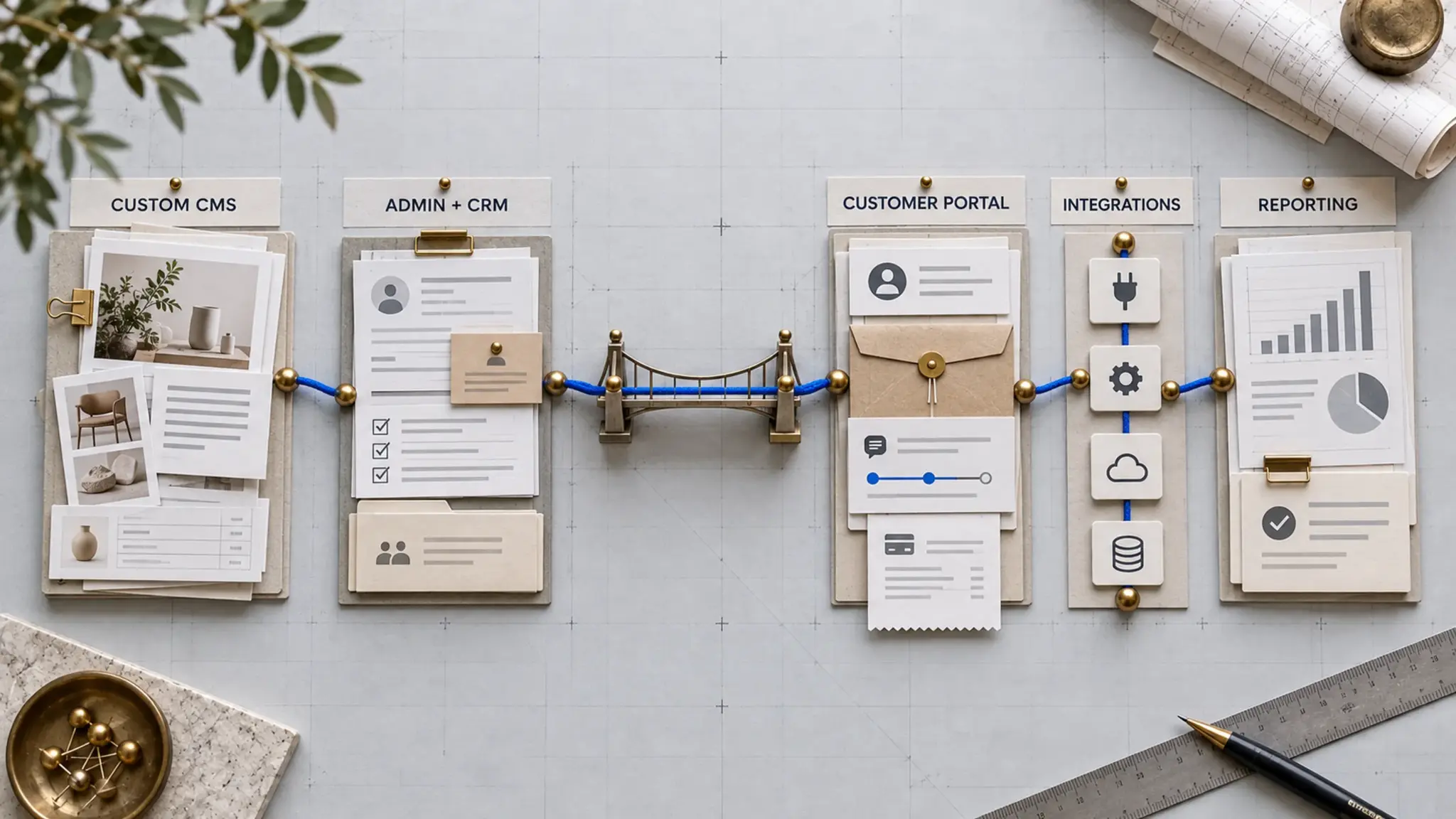
Information gets copied between forms, inboxes, spreadsheets, CRMs and scheduling tools. Staff become the integration layer, and management cannot see the full process.
- Form
- Spreadsheet
- CRM
- Calendar
Manual copying and follow-up, all day, in both directions.
One operating layer
The same information, entered once, moving through records, rules and permissions that the whole team can see.
The operating layer
One layer, runningthe whole operation.
Select a part of the business and follow it through the system: what comes in, where it lives, what the team does with it, and what comes out the other side.
Leads, end to end
Website enquiry
Lead record
Assignment
Follow-up
Sales outcome
Reporting
Illustrative flow. The modules, rules and records are designed around each business, which is the point of building the layer rather than buying one.
Run your website the way you run your business
Most website editors are built for everyone, so they fit no one. MOST CMS is fitted to your business. You log in and see your business: your vehicles, your services, your menu. Not a wall of settings you will never use.
It is the editor underneath the systems on this page. At CarGet Auto Group it runs a dealership’s inventory and leads; at Face Atelier it runs a studio’s services, prices and articles. Same engine, different screens.
MOST CMS comes with every MOST Launch website, $2,495 once. When a business outgrows it, the store, bookings and integrations are built here, as MOST Scale.
Real system / 01
One dealership.One operating view.
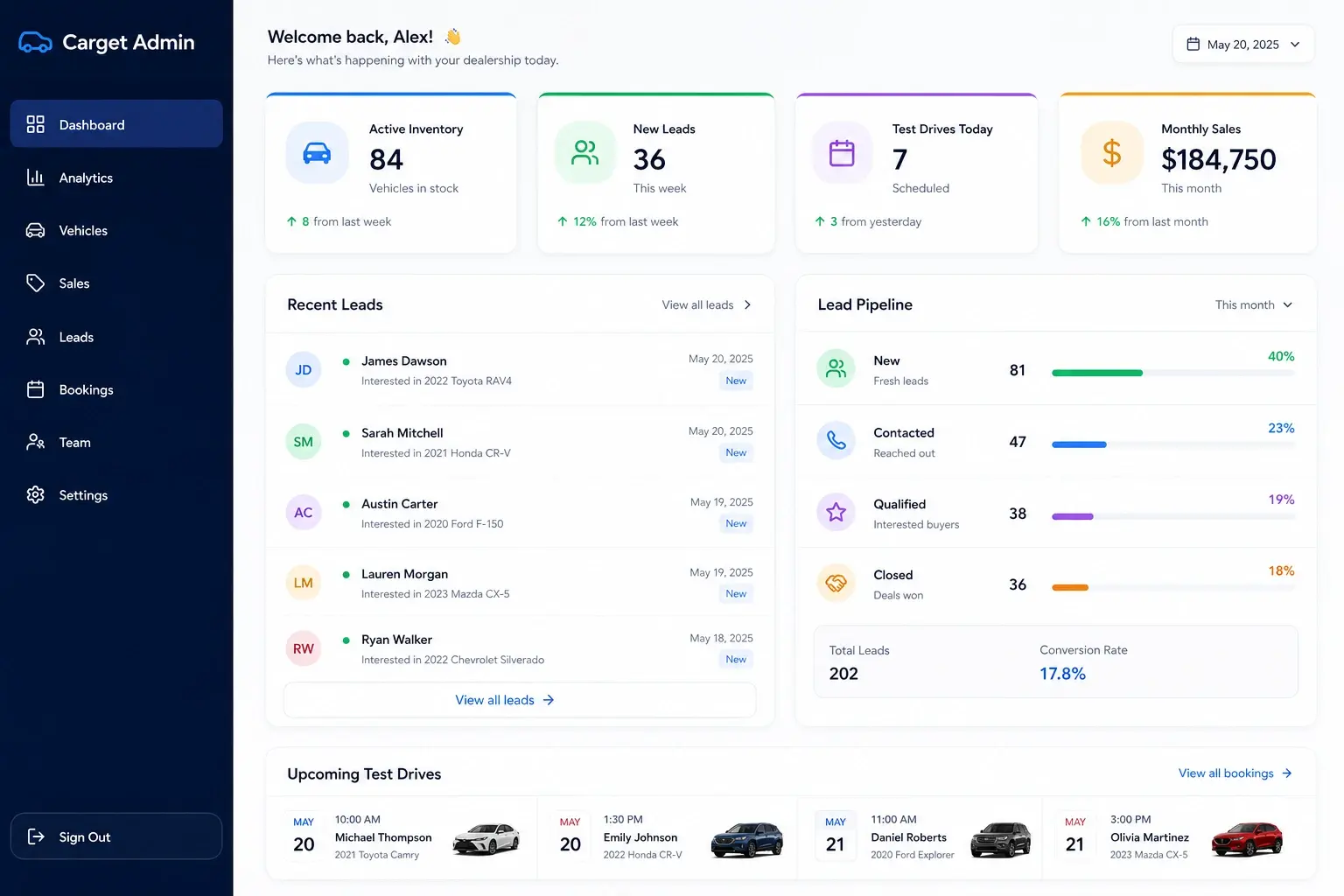
A custom backend that generates website content from inventory, runs lead follow-up and supports dealership operations, so the website, the stock and the sales work stay one system instead of three.
- Vehicles and inventory
- Leads
- Test-drive bookings
- Sales
- Operational reporting
- Inventory-driven website content
- Follow-up infrastructure
Real system / 02
A different business.A different system.
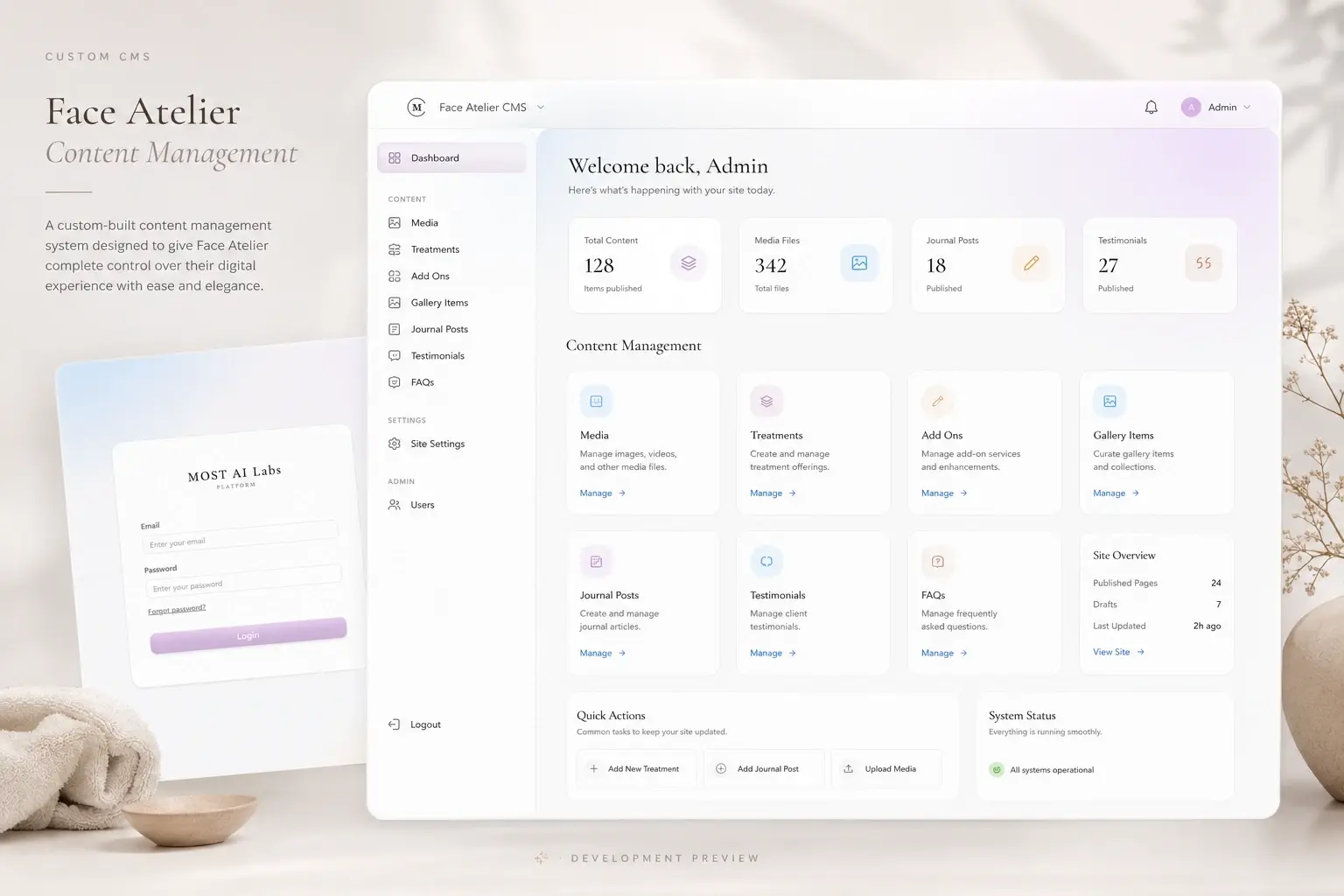
A studio does not run like a dealership, so its platform does not look like one. Face Atelier’s CMS manages treatments, media and editorial content around the way the studio actually works. The two systems on this page share an engineering standard and nothing else, which is the point.
- Treatments
- Media and gallery
- Journal
- Testimonials
- FAQs
- Site settings
- Users
What we build
Built around the workflow.Not the other way around.
01
Custom CMS
Manage the information that actually matters to the business, without generic platform clutter.
- Content
- Services
- Inventory
- Pricing
- Media
- Locations
02
Admin platforms
One operating interface for the daily work behind the website.
- Leads
- Sales
- Bookings
- Tasks
- Approvals
- Users
03
Customer and partner portals
Give customers, staff or partners secure access to the information and actions relevant to them.
- Accounts
- Documents
- Requests
- Status
- Payments
- Communication
04
CRM and lead systems
Capture, assign, track and measure customer opportunities from first enquiry to outcome.
- Pipelines
- Assignment
- Follow-up
- Lifecycle stages
- Notes
- Attribution
05
Inventory, booking and pricing
Build business rules into the platform instead of managing them manually across spreadsheets.
- Availability
- Scheduling
- Inventory
- Pricing
- Notifications
- Sales events
06
Integrations and APIs
Connect the systems that already work and replace only the parts creating friction.
- CRM
- Accounting
- Payments
- Analytics
- Existing software
Build, connector keep.
We do not recommend custom software simply because we can build it.
Keep
Use the existing tool when it already works. A system that the team knows and trusts is an asset, not a problem to be replaced.
Connect
Integrate tools when the problem is data flow or duplicate work. Often the fix is a connection, not a platform.
Build
Create a custom system when the workflow is unique, strategically important or poorly served by available software.
Integrations and APIs
Connect what already works.
The operating layer does not have to replace everything. Where a tool is doing its job, the platform connects to it, and the team stops being the integration.
- CRM
- Accounting
- Email and messaging
- Payments
- Calendars and scheduling
- Analytics
- Existing internal software
Scope
What’s included
What a systems engagement consists of. Which of these a business needs comes out of the mapping, not out of this list.
01
Admin platforms
The screen the business actually runs on: the records, the queues and the daily actions, in one place instead of five tabs and a group chat. It is modelled on the operation rather than on a generic CRM’s idea of one, which is why the objects in it are called what your team calls them.
02
Client and staff portals
A way for customers, partners or staff to see and do the specific things they should, without anybody emailing a spreadsheet. Each role sees its own view of the same underlying data, so there is one version of the record rather than a copy per audience.
03
Dashboards
One operating view of what happened and what needs attention, built from the live records rather than from an export somebody has to remember to run. At CarGet that is a single screen for enquiries and activity, replacing the job of counting emails.
04
Integrations and APIs
Connecting what already works rather than replacing it: accounting, calendars, payment, marketing platforms, a supplier feed. Where a tool is doing its job, the system reads and writes to it; where it is the problem, that is a decision to take deliberately. We say which before anything is built.
05
Moving off spreadsheets
A spreadsheet running an operation is not a failure, it is usually an accurate description of the process nobody has written down. The move is done in stages, with the sheet as the reference until the system is demonstrably better, not by a cutover on a Friday. The method is in replacing spreadsheet operations safely.
06
Permissions and audit trails
Who can see what, who can change what, and a record of who changed it. This is the part that matters the first time somebody asks why a number moved, and it is almost impossible to add convincingly afterwards. Background: data ownership, permissions and audit trails.
07
Ownership of the code and the data
The source code, the database, the hosting accounts and the domain are in the client’s name, and the system runs on standard tooling rather than a platform only we can operate. If you stopped working with MOST tomorrow it would keep running and another developer could pick it up. What that means in practice: ownership of source code, data and infrastructure.
Ownership and reliability
Built to becomean asset.
- Client owned
- Code, database, infrastructure and administrative access remain under client control.
- Permissioned
- Users see and change only what their role requires.
- Traceable
- Important activity can be logged, reviewed and audited.
- Extendable
- The platform can gain new modules and integrations without rebuilding everything.
Systems first.Automation second.AI where it earns its place.
AI cannot repair unclear ownership, inconsistent data or a broken workflow. The operating system establishes the records, permissions, rules and process. AI can then classify, generate, recommend or act inside that controlled environment.
How we work
Map before building.
01
Map
Document the current workflow, systems, handoffs and friction.
02
Define
Specify users, data, permissions, business rules, integrations and the smallest useful release.
03
Build
Design and develop working modules in a staging environment.
04
Deploy
Migrate data, test real scenarios, train the team and document the system.
05
Improve
Measure adoption and operational results, then extend only where evidence supports it.
Investment
Fixed scope aftersystem mapping.
Smaller integrations and focused admin modules may be scoped independently. Full operating platforms are quoted after workflow, data and integration requirements are defined.
The mapping stage exists so the quote is built on the actual workflow rather than a guess. Scope and price are agreed in writing before build work starts, and both stay fixed unless the scope genuinely changes.
Where this works, and where it does not.
A good fit
- The team is copying information between tools.
- A generic CMS or CRM no longer matches the workflow.
- Management lacks one reliable operating view.
- The business needs custom permissions, rules or integrations.
- Manual processes are limiting growth or accuracy.
- Ownership and extensibility matter.
Probably not us
- A standard SaaS product already solves the problem well.
- The business has not defined the workflow it wants to improve.
- The goal is software for software's sake.
- The project requires a cheap template admin panel.
- Nobody inside the business can own the process after launch.
Questions before the build.
What is a business system?
The software layer a business runs on: where records live, who can change them, what rules apply, and how work moves between people. In practice that means a custom CMS, an admin platform, a CRM, portals, inventory and booking logic, and the integrations between them — one operating layer instead of disconnected tools.
How is this different from a website?
The website is what customers see. The business system is what the team uses to run the operation behind it: managing inventory, leads, bookings, content and reporting. They work best designed together, which is why MOST builds both, but they are different layers doing different jobs.
Do we need custom software?
Possibly not, and we will say so. Our working rule is keep, connect, build: keep tools that already work, connect tools when the problem is data flow or duplicate work, and build custom only when the workflow is unique, strategically important or poorly served by available software.
Can you connect our existing CRM?
Usually, yes. Most established CRMs expose APIs, and integration is often the right answer instead of replacement. Where a system has no usable interface, we tell you what is and is not possible before anything is scoped.
Can you replace spreadsheets?
Yes — this is one of the most common starting points. A spreadsheet that has quietly become the company's inventory, pricing or scheduling system gets rebuilt as structured records with rules, permissions and history, so it stops depending on one person being careful.
Do you build customer portals?
Yes. Secure, permissioned access for customers, staff or partners: accounts, documents, requests, status, payments and communication, scoped to exactly what each role should see.
Can you work with our existing codebase?
Often, after a review. Some systems are worth extending, some are worth integrating with, and some genuinely cost more to keep than to replace. The mapping stage answers that honestly before any build decision is made.
Who owns the source code and data?
You do. Code, database, infrastructure and administrative access remain under client control, the same ownership position MOST takes on every service. If we stopped working together tomorrow, the system keeps running in your hands.
How do permissions and security work?
Access is role-based: users see and change only what their role requires. Important activity can be logged and audited, and the platform runs on your infrastructure and accounts rather than a shared multi-tenant product.
Can AI be added later?
Yes — the system is the foundation AI needs. Once records, rules and permissions exist, AI can classify, generate, recommend or act inside that controlled environment. That work is MOST's AI & Automation service, and it slots into platforms built this way without a rebuild.
How long does a build take?
Focused modules and integrations typically take weeks; full operating platforms are phased over longer, starting with the smallest useful release. The honest answer comes out of mapping, because the timeline depends on workflow complexity, data migration and integrations — and we put it in writing before starting.
What does a custom business system cost?
Business systems are MOST Scale, built in stages, smallest useful stage first. It starts with system mapping at $2,500 to $4,500. One integration or admin module is $5,000 to $12,000, an operational platform is $12,000 to $25,000, and a connected business platform is from $25,000. All CAD, plus tax, and the price is agreed in writing before build work starts.
What happens after launch?
Deployment includes data migration, real-scenario testing, team training and documentation. After that, the platform is extended only where evidence supports it: adoption and operational results decide the next module, not a roadmap invented on day one.
When the current tools stop fitting
Build the systemthe business needs next.
Start with the workflow. Keep what works. Connect what should talk. Build only what is missing.
Vancouver, BC · Serving Metro Vancouver
Insights
Read the thinkingbehind this work.
AI Implementation
What an AI agent actually costs, and what it doesReal cost ranges, real examples, no buzzwords. What AI agents do in a working business, and how to know if one will earn its keep in yours.8 min readBuild decisions
Build, buy or integrate: when custom software makes senseA decision framework for choosing custom software, an off-the-shelf product or an integration without turning preference into strategy.9 min readBuild decisions
What a custom CMS is, and when you do not need oneA plain-language guide to content models, editorial workflows and the point at which a custom CMS becomes unnecessary product development.8 min readBrowse the full library:The Field GuideBuyer GuidesAI by Industry
Start here
Start with a system map.
Before anything gets built we map how the work actually moves. That map is yours whether or not we build anything.
5.05 out of 5.10 Google reviews
Prefer to talk? (250) 581-0523 or [email protected]